Odyssey Harbour
Texting Athena
Athena is the assistant in Odyssey Harbour, the client-records system used by Odyssey Wealth and other advisory firms. Advisors and staff can text Athena about their own work, such as tasks and meetings, and Athena replies to the texts they send.
Who gets texts
Only registered advisors and staff of firms using Odyssey Harbour. They sign up themselves, from inside Harbour, with their own mobile number. Athena never texts clients or the public, and no one is added without completing the steps below.
How to opt in
- Sign in to Odyssey Harbour.
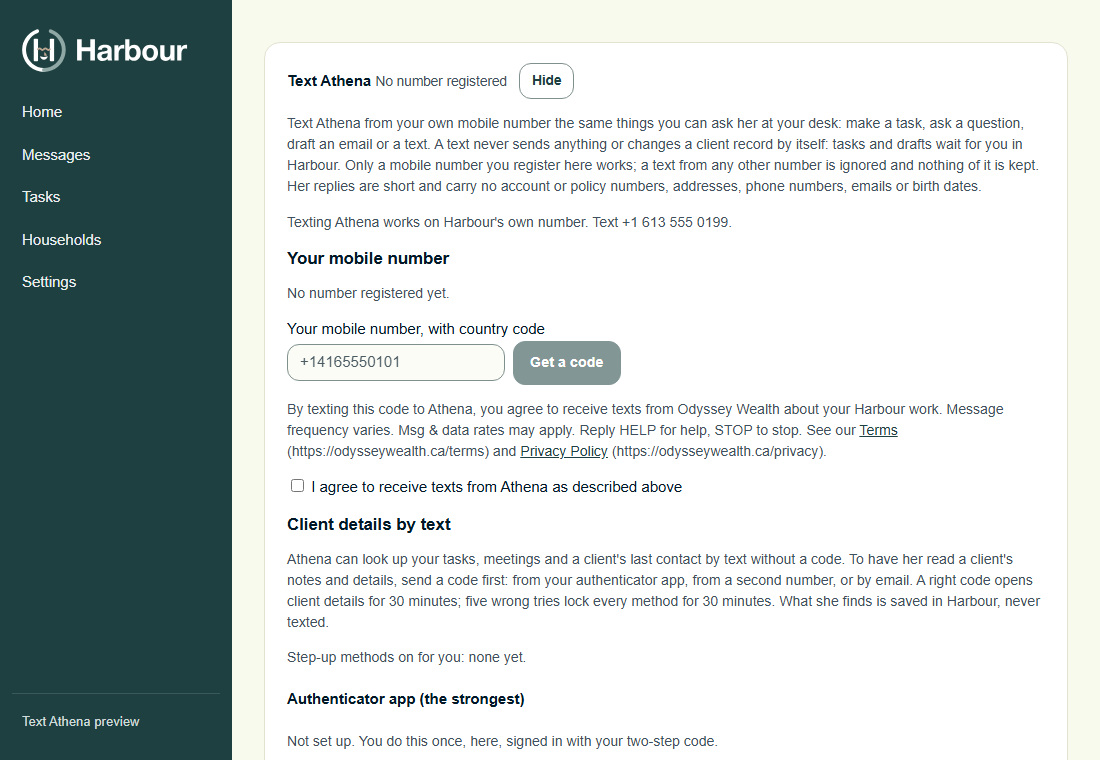
- Open Settings > You > Text Athena.
- Enter your own mobile number, read the consent text beside Get a code, and tick the box “I agree to receive texts from Athena as described above”. Get a code stays off until the box is ticked.
- From that mobile, text the 6-digit code shown on screen to the Athena number to confirm.
Athena then replies:
Odyssey Wealth: Your mobile is now registered to text Athena. Msg frequency varies. Msg & data rates may apply. Reply HELP for help, STOP to stop.
The consent text shown in Harbour
By texting this code to Athena, you agree to receive texts from Odyssey Wealth about your Harbour work. Message frequency varies. Msg & data rates may apply. Reply HELP for help, STOP to stop. See our Terms (https://odysseywealth.ca/terms) and Privacy Policy (https://odysseywealth.ca/privacy).
How to stop or get help
- Text STOP (or CANCEL, END, QUIT, UNSUBSCRIBE) to stop. You will get one message confirming you are unsubscribed, and no further texts.
- Text START to resume.
- Text HELP for help, or email hello@odysseywealth.ca.
Message frequency varies. Msg & data rates may apply. Carriers are not liable for delayed or undelivered messages.
Your mobile number
We do not sell or share your mobile number or SMS opt-in data. See the SMS sections of our Terms of Service and Privacy Policy.